Showing posts with label grow your list. Show all posts

Wednesday, 27 January 2016

13 Ways to Increase Your Conversion Rate Right Now


Increasing your conversion rates is absolutely crucial. Having a good conversion rate is the foundation of high sales volume.
Let’s say your goal is to increase your sales by 50%. How would you do it? More advertising? Producing 50% more content? 50% more time, effort and money into marketing?
All of this could work, but it sure is much faster and cheaper to do it by increasing your conversion rate. Remember – if you have 2% conversion, going to 3% is actually a 50% uplift in results!
Sometimes just a small tweak can lead to significant improvement in conversion rates. Many small and a few big tweaks combined can bring dramatic increase in your results.

1. Do A/B testing

In real estate it’s about location, location, location. In conversion optimization it’s testing, testing, testing.
Wait! What’s A/B testing in the first place?
A/B testing (or split testing) is a technique for increasing your website’s conversion rate (that’s its ability to turn visitors into customers). If you had two possible headlines for your page and you couldn’t decide which to use, you could run an A/B split test which one works better.
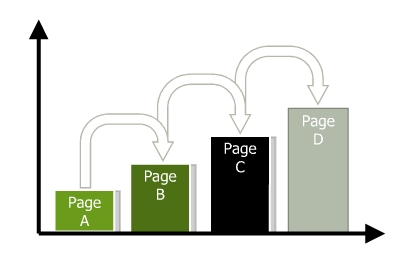
You create two alternative versions of your page (page A and page B), each with a different headline. A/B testing software directs 50% of the incoming traffic to page A and 50% to page B. Both pages have a call to action, and in the end you count how many people took the action.
The page with more conversions (more people taking action) wins.
Your goal should be to have at least one, and preferably several A/B tests running at any given time on your site. There’s no “perfect” when it comes to marketing sites, and the only way you learn about what works and doesn’t work is to continuously test.
Deciding what to test
Marketers guess what factors to concentrate on and mess around testing things that have little or no impact on users or conversion goals. Instead, use the data available to you to spot the most important projects to focus on.
To help you decide what tests you want to do, consider the potential revenue each test may bring, and rank tests accordingly. It’s important to test one hypothesis at a time – otherwise you won’t know which change made the difference.
Main things to test:
  • The headline. You should have a strong, convincing and believable headline that promotes the main offer. The legendary ad guru David Ogilvy once said: “On the average, five times as many people read the headline as read the body copy.  It follows that, if you don’t sell the product in your headline, you have wasted 80% of your money.
  • Page layout and navigation.
  • The offer. What is it that the customer is getting for their money (how is it all described and laid out).
  • The size of your order buttons and the wording of call to action (e.g. “Join now and get access to XYZ” vs “Sign up”). For software products the primary call-to-action should often be the “demo/trial”, not the “checkout/purchase” buttons. Enlarging your action buttons usually helps.
  • Different media: test adding a video to communicate key points.
  • Radical change. Sometimes you want to compare two totally different approaches.
What to use for testing
Many entrepreneurs spend money buying expensive testing software before they actually understand how to implement a conversion rate optimization process. You don’t need to spend much.
  • Google Content Experiments – built into Google Analytics. Free. The downside is that it’s not real-time, and you always need to create 2 separate URLs for testing.
  • Optimizely says it’s an A/B testing software you’ll actually use, while Visual Website Optimizer says it’s the easiest. They’re price similarly (the latter being a bit cheaper) and not out of reach for small business owners (but not dirt cheap).
There’s no excuse for NOT testing. Testing is easy, fast and actually… fun! You get to test your gut feeling, learn new things all the time and exercise your creativity.
Testing should also never end. As soon as you have a winning page, try to build on that and test something else.
Incremental positive changes lead to substantial growth.
 

2. Create a compelling and clear value proposition

The potential of your conversion rate is determined by the value proposition, making it the most important conversion factor.
What exactly is a value proposition?
It’s the primary reason a prospect should buy from you. Customers not only want to know “What’s in it for me?” but “Why buy from you?”
If you had just 10 words to explain why people should buy from you instead of the competition, what would you say?
Many marketers try to improve results by changing page elements like font colors and sizes, button shapes, images, incentives, and so on, when the first step should really be focusing on strengthening their value propositions.
If your home page or the product page says “Welcome!” or lists just the name of your company or the product, you’re missing out. Note that there is a difference between the value proposition for your company and your product. You must address both.
What makes a good value proposition?
  • It must be differentiated from your competitors’ offers.
  • You may match a competitor on every dimension of value except one. You need to excel in at least one element of value (key important factor for the buyer).
Crafting a value proposition requires substantial reflection on what is unique about your company and your products and services. Having a powerful value proposition is not enough; it must be communicated effectively to achieve optimal results. You need to refine your value proposition until you can articulate it in a single, instantly credible sentence.
However hard you work on expressing your value proposition, to know its true effectiveness you must test to see how it resonates with your ideal prospect. Optimizing value propositions is a continual process that involves identifying, expressing, and testing/measuring. Use A/B testing to do it.

3. Set up a sales funnel

Sometimes what kills your conversions is that you’re asking for the sale (signup, whatever) too fast. People might be “just browsing”, not be psychologically ready or not in a hurry to buy right now.
The more expensive and/or complicated the product, the more time people need before they’re ready to commit. 
As I mentioned earlier, for software products sometimes offering a demo or a free trial instead of asking for a signup or purchase can bring significant improvement in conversions. But in many cases you need to just slow down and build a sales funnel to build trust, develop relationship and prove your expertise.
Let’s say your product is an online course on DIY home repair. Here’s how you should go about it.
What the visitor wants
  • To learn about DIY home repair
What you want
  • Get the visitor to buy your course
How to do it
  • Offer valuable free home repair advice via your blog, videos, free reports, whitepapers
  • Become their trusted advisor
  • Give them compelling reasons to sign up to your email list (in exchange for some good info)
  • Free drip content video course via email
  • Send them to your sales copy and ask for the sale
Some people say it takes at least 7 contacts with a prospective buyer before they’re ready to buy from you. I haven’t seen any recent research to back this up, but I know for a fact that the longer and deeper your relationship with the prospect, the more likely they are to buy from you.
So slow down. Offer value and results in advance, way before asking for the sale. Just capture their email address, so you could continue talking to them.

4. Cut the jargon
Clarity trumps persuasion, always.
Recently I came upon a site with the following value proposition:
“Revenue-focused marketing automation & sales effectiveness solutions unleash collaboration throughout the revenue cycle”
What does it mean? Can you now explain what they do and how is it useful to you? Not really, right?
Do not try to woo people with fancy, complicated business language – it just doesn’t work. 
You write for people, it’s people who read your site. A marketing director or a purchasing manager are people too. Don’t write for companies, write for people.
Clarity is something that I see marketers constantly struggling with. The best way to re-phrase all of the marketing speak on your site is to imagine you’re explaining your product to your close friend. If there’s a sentence worded in a way that you wouldn’t use in a conversation with a friend, re-word it.

5. Address objections

Whenever people read your offer, there will be friction. They’ll have some conscious and sub-conscious objections to what you’re saying and hesitations about taking the offer.
While during in-person sales we can uncover those hesitations with questions and address the concerns, online that’s kind of difficult. The solution is to prevent those objects by addressing all the possible issues in your sales copy right away.
Step one – create a list of all the possible hesitations and objections your potential customers might have. Step two, add info to your sales copy to eliminate or alleviate those concerns. The list can contains things like
  • You don’t understand my problem (explain the problems your product solves)
  • Why should I believe you? (show off your credentials, experience, awards etc)
  • What if it doesn’t work on me? (have testimonials of all kinds of users that have benefited from your product)
  • It’s not worth the money, there are cheaper alternatives out there (explain your price, compare with the competition, prove the value your product offers)
… and so on. It’s important to come up with as long list as you can. Seek external input, do user testing and ask your customers to figure out what all they might be concerned about.

6. Increase trust

Let’s say you walk down the street, and some random dude comes up to you. “Hey, wanna buy an iPad2? Just $50. It’s brand new.” Would you buy it?
You know the product is good. You know it’s a really good deal. But you probably wouldn’t still buy it. Why? Because you don’t trust him.
Sales guru Zig Ziglar once said that there are only 4 reasons why people won’t buy from you:
  • no need,
  • no money,
  • not in a hurry,
  • no trust.
We can’t do much about the first 3 reasons, but we can build trust. Add trust elements to your website and see your conversions increase.
So what makes people trust a website? The good thing is that Stanford Persuasive Technology Lab has studied this over the years and has the answer.
Here’s the list, make sure your website has all of the items present:
  • Make it easy to verify the accuracy of the information on your site. You can build web site credibility by providing third-party support (citations, testimonials, articles in well-known publications, source material) for information you present, especially if you link to this evidence. Even if people don’t follow these links, you’ve shown confidence in your material.
  • Show that there’s a real organization behind your site. The easiest way to do this is by listing a physical address. Other features can also help, such as posting a photo of your offices or listing a membership with the chamber of commerce.
  • Highlight the expertise in your organization and in the content and services you provide. Do you have experts on your team? Are your contributors or service providers authorities? Be sure to give their credentials. Are you affiliated with a respected organization? Make that clear. Conversely, don’t link to outside sites that are not credible. Your site becomes less credible by association.
  • Show that honest and trustworthy people stand behind your site. Find a way to convey their trustworthiness through images or text. Post employee photos and bios that tell about family or hobbies.
  • Make it easy to contact you. A simple way to boost your site’s credibility is by making your contact information clear: phone number, physical address, and email address.
  • Design your site so it looks professional (or is appropriate for your purpose). People quickly evaluate a site by visual design alone. When designing your site, pay attention to layout, typography, images, consistency issues, and more. Amateur-looking websites kill trust, invest in a quality designer.
  • Make your site easy to use — and useful.  Research shows that sites win credibility points by being both easy to use and useful. Some site operators forget about users when they cater to their own company’s ego or try to show the dazzling things they can do with web technology.
  • Update your site’s content often. People assign more credibility to sites that show they have been recently updated or reviewed. If you have a blog or a news section, make sure they’re updated regularly. Nothing says “out of business” like an abandoned blog.
  • Use restraint with any promotional content (e.g., ads, offers). Nobody likes hype, popups and blinking banners. People associate it with scam and spam. If possible, avoid having ads on your site. If you must have ads, clearly distinguish the sponsored content from your own. As for writing style, try to be clear, direct, and sincere.
  • Avoid errors of all types, no matter how small they seem. Spelling errors and broken links hurt a site’s credibility more than most people imagine. It’s also important to keep your site fast, up and running.

7. Make it easy to buy from you

Your goal has to be to make doing business with you as easy as possible. Your users should not try to figure out how to buy from you or where to click. It has to be intuitive and self-evident. As few clicks as possible.
Could your grandma be able to buy from your site within a minute or two?
  • Tell your users what they should do next. In every page, always guide the user towards the action you want them to take. Make the primary next step look more important than other links.
  • Do not give users too many options. The Paradox of Choice (a great book, btw) states that the more choice you will give your users, the easier it is to choose nothing. Choice paralyzes. If you have a lot of products, build better filters, so your prospects could identify the right one for them without spending too much time.
  • Ask to fill as few fields as possible. The more fields you have in your order or sign up form, the less people will fill it. Add the option to sign up via their Facebook or Google account. Don’t ask for anything that you don’t absolutely need to know in order to fulfill the order.
  • Do not force users to sign up in order to buy. Do you know the story of the 300 million dollar button? I suggest you read it. The main point: do NOT force people to sign up as a user in order to buy from you. Let them check out as a guest. It will make a world of difference.
  • Offer free shipping. Free shipping was the most popular motivation for 82% of UK and 80% of US consumers in a study conducted by eConsultancy, and gives etailers that offer this option a clear advantage over competitors.

8. Communicate value

A common mistake entrepreneurs make is that they do not provide enough information about the products and services they sell.
Let’s take that chair, for instance. If I’d describe it like this (all true facts):
  • Seat and back of breathable pellicle suspension material for long-term comfort.
  • Weight: 51 pounds
  • Color: Classic Carbon Pellicle
  • Full 12-Year Manufacturer’s Warranty
Price: $869.
Would you pay $869 based on what I just listed here?
No, that would be ridiculous. Yet so many sites do exactly that (luckily the maker of this chair provides more info than that).  They just list a bunch of bullet points with features along with the price.
The best way to sell products and services is to to add as much information about them as is possible. Pages and pages and pages, videos and images. It’s true that 79% of people won’t read it all, but 16% read everything! That 16% is your main target group.
If one reads all of the product info and is not convinced yet, you have a problem. But if one is convinced after reading just 1/4, they can skip the rest and just complete the purchase right away. Up to 50% of potential sales are lost due to inadequate information, says IDC, a global research company.
You need to provide enough information so that the prospect could convince themselves
Add pictures, videos, reviews to all of your products.  Intelligent, neutral and benefit-oriented sales copy works the best. Take a look at Amazon – they manage to create a lot of content for most products they sell, and they sell millions of products.
Aah, and list the price AFTER you communicate the value. Otherwise people might make a snap judgement based on the price without reading the value it offers.

9. Offer proof

Whatever you claim, you need to back it up with proof. People are skeptical and they want to see the evidence.
So what kind of proof can you provide?
  • Customer testimonials. People who used your products verify your claims. It’s a good idea to use testimonials from customers that were in a worse situation that the average customer. If even people in terrible circumstances could get the results, so can they!
  • Case studies. We’ve all seen before and after type of case studies. Very effective.
  • The results of scientific tests and studies. I know a log home manufacturing company that wrestled with the claims that log homes lose a lot of heat in the winter and they’re expensive to keep up. They commissioned an independent study from a well-known university. The study found that the log homes are as energy efficient as any other kind of buildings. Now the manufacturer can refer to this study to back up their claims.
  • Third-party reviews. Did a trade magazine or a blog write a glowing review? Show it off and link to it.
  • Social proof. If you have thousands of customers, make it a well-known fact. Nobody wants to be the only idiot using your service. If you have thousands of people / companies use your service, can’t be all that bad!
  • Show it! Nothing like a good demo to prove what your product does. Use videos that showcase your product in action.
Go over all the claims you make in your sales page and figure out how to add some proof.

10. Remove distraction

This is big. You want people to focus on a single action and not be distracted from it.
Are there items on the page that could divert the visitor away the from the goal?
The more visual inputs and action options your visitors has to process, the less likely they are to make a conversion decision. Minimizing distractions like unnecessary product options, links and extraneous information will increase the conversion rate.
On your landing pages and product pages, remove or minimize everything that is not relevant to users taking action.
  • Remove or shrink the menu.
  • Get rid of sidebars and big headers.
  • Take off irrelevant (stock) images.
Ask yourself is there anything else that you could take off page, something that is NOT contributing to the conversion?

11. Compare with the competition before they do

Every product and service has its competitors – direct and indirect. Research shows clearly that people do their homework before purchasing a product and compare among providers. It seldom happens that someone will buy your product without checking out your competition first.
Taking that into account, use it – compare your products to competing products before users do.
People are lazy. More often people compare things without giving it a lot of thought – they just look at the price and main features. For example when choosing a web host they look at the server space and monthly payment and that’s it. You, as an expert in your field, know that actually many other things should be considered.
When it’s you doing the comparison, you can point out the things you feel are your biggest advantages over the alternatives. If your product is more expensive than others, then this is your chance to explain why.
What if your competition is already doing it?
Imagine if your competitor is openly comparing your services and making it look like their offer is superior, and you don’t provide any information on why your product is better? A large number of people will take that competing offer.
Another benefit to adding product comparison pages to your website is that it can keep people from leaving your website. They can already do the comparison on your site, so why leave? It won’t keep all of them on your site, but you’ll definitely win over a good portion of visitors.
How to do the comparisons?
This depends on your product. If it’s a pure spec­-based product like say, a laptop, you can compare the specs (battery life, disk space, RAM etc) in a traditional table. If your product is more complex, use a more descriptive comparison.
If some of the specs are lower than the competition’s, point out that maybe your support is way better or you provide personal consulting or its more green or whatever. Also, admitting your shortcomings is a good thing – it makes the rest of your case more believable.
The traditional way is using tables like this, but probably you can come up with better, more creative ways.

12. Reduce or remove risk

Whenever there’s a transaction, there’s risk. Usually the vendor has the buyer carry most of the risk. If the risk seems to big, the purchase won’t take place.
Offer guarantees to eliminate or reduce the perceived risks your prospects might have. Here are some examples of great guarantees:
  • Hyundai and America’s Best Warranty. Hyundai struggled with years with a reputation that it makes crappy cars that break down fast. So they initiated a 10-year warranty – basically saying that ‘how can it be a bad car if we’re giving it such a long warranty?’ . Now Hyundai is considered the new Lexus.
  • The Punctual Plumber. Plumbers are renown for being late. To combat this prejudice, they branded themselves as ‘The Punctual Plumber’ and will pay you for every minute they’re late. If they’re willing to do it, they probably won’t be late, will they? Guarantee removes risk.
  • Pizza delivered in 30 minutes or it’s free. If you’re ordering pizza, the delivery time is a concern. With a guarantee like that, this fear is eliminated.
  • Not only will we give your money back, but also compensate your pain. This is the most powerful kind of guarantee – a pain compensation guarantee.
30-day money-back guarantee is like the industry standard and you should definitely not offer any less. Try to do better than that.
A/B test various guarantees to find out what works best.

13 Add incentives to take action right away

Is there an indication that the action needs to be taken now? The tone of the presentation, offers and deadlines can all influence urgency. I bet you have seen urgency notifications like this before:
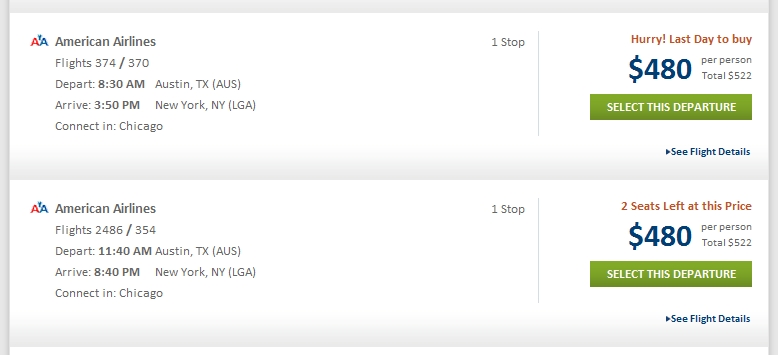
It might seem obvious to some and some might think it can’t possibly work, but it does and very, very well. Nothing creates urgency like scarcity.
There’s 2 kinds of of scarcity you can create:
  • quantity-related scarcity (2 seats left at this price)
  • time-related scarcity (last day to buy)
If the supply of your product is endless, you can give out time-sensitive bonuses, a free gift to first X amount of buyers or a discount if they complete the purchase within a certain time frame.
Word of advice: the reason for scarcity has to be authentic. Do not lie to your customers, ever. If it’s fake scarcity, people will know, and your trustworthiness plummets. It’s not worth it.
Thank you for reading. Until next time.
 

Monday, 4 January 2016

15 Steps to the Ultimate Lead Capture Landing Page

ultimate lead capture landing page
If you’re looking to build a lead capture landing page, it’s not just a matter of slapping a form on a page and driving traffic to it. Well, you could, but it wouldn’t perform well.
Instead, follow these 15 steps and create a high performance landing page designed specifically for gathering leads.
Read on and learn how to build the ultimate lead capture form, an example of which will be uncovered right at the end.

Step 1. Define your target market & campaign goal

target market
Who are you marketing to?
Before you start building anything you need to know who you are marketing to. The chances are you’re creating a campaign for one of the following targets:
  1. Existing customers: You might think that having a customer means you don’t need to continue marketing to them. Sometimes a customer is inactive so your goal is reengagement, through exposure to new content or product demos that may turn them from a fence sitter back into a real customer.
  2. Leads in your email or CRM lists: Once you’ve established a list of leads, your goal should be to nurture them with more content and events to turn them into customers. Perhaps you get them to register for an e-course using autoresponders to drip content into their inboxes, slowly building a rapport that eventually moves from a soft sell content marketing strategy, to a request to sign up (potentially with a special offer).
  3. Prospects: This is the purest form of lead capture, where you are chasing entirely new prospects through the use of content marketing.
Lead form tip: If you are marketing to customers or leads, pre-populate as many of your lead capture landing page form fields as you can, to reduce the friction involved in filling out the form, and to create a sense of personalization.

Step 2. Define & create a relevant reward

give a relevant reward on your lead capture landing page
Are you giving something appropriate away in exchange for personal data?
Having established your target audience, you need to figure out what to offer them in order to get their important personal or business data.
Everyone likes to be rewarded, getting free stuff is awesome. But with lead gen there’s a little work to do first, and it gets pretty personal. Typically the very minimum a prospect, lead or customer will have to part with is an email address (covered in step #3).
Before thinking about what you’re asking for in exchange for your content, you need to define the content, and make it relevant to your target’s needs. Here are some of the things you can create:

Digital content to give away

There is a ton of digital content you can give away, first we’ll list them, then explain how they should be used differently for prospects, leads and customers.
  • An ecourse delivered over a period of time
  • Report/whitepaper with important industry stats
  • Ebooks – comprehensive guides to different aspects of your business
  • A newsletter with tips related to your area of subject matter expertise
  • A podcast – useful for people who like to listen during a commute or workout
  • Checklists/scorecards – good for people that need to see how well they are doing and produce a to-do list of things to improve
  • Webinars – live sessions, often with Q&A with experts and special guest presenters
  • Presentations – slides you can incorporate into your own presentations
  • Consultation – this is when someone requests your time to explore if they want to use your product or service

Prospects

Prospects are people you haven’t come into contact with yet, so they need extra reasons to believe in what you’re giving away. They need a softer sell, usually educational material that doesn’t push your product, like an ebook.

Leads

Leads are prospects who have converted by already consuming some of your content. These are the people you really want to convert into customers. As such they should be receiving content with signup CTAs and links to register for product demos.

Customers

Customers come in two forms: active and inactive. Your goals here are to keep active customers happy with instructional material that makes their life easier, and then re-engage your inactive customers with special offers, and updates on new features that could reactivate them. Customers are prime candidates for newsletters and ecourses.

Webinar tips: Have a webinar calendar to allow people to sign up in advance. List each session as beginner, intermediate or advance – much like you would with a yoga calendar. And remember to inform people on your landing pages that they will receive a recording of the webinar the next day if they are unable to attend – this will increase registration significantly.
Crucial to your success with lead gen is to balance the reward (the size of the prize) with the friction involved in getting it. This is where your choice of form fields come into play…

Step 3. Define the required form fields

required fields
Do you really need to ask for a fax number?
What’s an appropriate number of form fields to ask for in exchange for your content? Ideally, you would test this to find out what number of fields converts the best, while still getting the data you need to successfully segment and re-market to them in the future.
Here’s a breakdown of the content listed in the last section with an appropriate level of information you should ask for (note these are simple guidelines – every situation will be slightly different).

Email only

  • Presentation slides
  • Checklist/scorecard
  • Podcast

Name and email

For a more personalized experience over a period of time.
  • Ebook
  • Newsletter
  • Ecourse
  • Report/whitepaper

Name, email and company information

Company information might include: size of company and phone number. Often used for longer sales cycle items.
  • Webinar
  • Consultation
  • Product demo
Note, you could ask for a lot more if you want to, but realistically, an email is all you really need for most things.
Form tip: Scale how much information you ask from prospect, lead, customer (prospect being the least, and customer the most).

Step 4. Craft a headline to match your promotional ad source

message match
Does your headline match the ad that was clicked on?
Message match is the term used to describe the connection between the call-to-action (CTA) of an advertisement and the headline of the destination page.
There are two reasons why this is important:
  1. The human factor: When someone clicks a CTA they have a level of intent that must be matched when they arrive at their destination. For example if they clicked on an ad for used pickup trucks, and they arrived at the homepage of a used car business where there was no direct mention of pickup trucks. Immediately the message match has been broken and they will feel like they have made a bad click. The end result of this is that they either get lost trying to find what they came for, or ,ore likely they just hit the back button and leave.
  2. The machine factor: It’s not just people that get affected by poor message match. If you are doing paid advertising such as Google AdWords, there is a bot that reads your target page to see if there is a connection to the keywords in the ad. In the previous example, you’d get a lower Google Quality Score for your ad, and consequently a higher price for your ad.

An example of good message match

Here’s an example from an Unbounce banner CTA that sits at the end of our blog posts. Read the text on the button, as this will be the last thing in the mind of a visitor when they click it.
unbounce cta
Now consider the headline in the destination landing page, and how closely it matches that of the CTA:
landing page message match
Always pay close attention to your message and you’ll increase your conversion rates by virtue of more people staying on a page they asked to visit.

Step 5. Establish relevant trust elements

add trust factors to your landing page
Is your lead capture page trustworthy?
Trust is key to making people believe you won’t be spamming them after getting your email. Social proof is a key element here as we’ll see in the list of trust element you can include on your page:

Trust elements

  • Registrant count: If you are running a webinar, list the number of registrants to encourage a herd mentality (if that many people are going, it must be good). Note: only start listing the number when it gets to an impressive count.
  • Download count: Similarly, show how many people have downloaded your ebook.
  • Share count: Showing the social share numbers shows how many people find your content valuable enough to tell others about it. The best place to put this is on your confirmation page when they’ve already expressed interest.
  • Anti-spam statement: Put a simple statement next to the email form field that says you won’t spam them ever.
  • Testimonials: Customer testimonials show that others have made the effort to report back on the quality of your content. The best kind are video testimonials, followed by written ones with a photo and official title. Never use a fake testimonial – they’re usually easier to spot that a wig.
  • Customer logos: If you have an impressive client list, take advantage of this by prominently showing them on your page.
  • Media mentions: You’ve seen these before. It’s the list of logos from CNN, NBC, FOX News, TechCrunch etc. If you’ve been lucky enough to have been mentioned in big publications or on TV, make sure to show off.
  • Security badges: If you’re asking for sensitive data, include these to show that you are using security best practices, such as a secure server. Examples would be McAfee or Symantec.
  • Content previews: Leverage people’s desire for “Try before you buy” by including a preview of your content such as a chapter of your ebook. Amazon has perfected this with their “Look Inside” concept.
  • Past content examples: If you are asking someone to sign up for a newsletter, show them an archived example so they know what they are signing up for.

Step 6. Write a short persuasive and descriptive intro paragraph

intro paragraph
Make it clear what people should do to start understanding your service.
Your opening paragraph should be a short and succinct extension of your headline, which serves as an introduction to some bullet points (coming up next) describing the product or service you’re promoting.
Let’s look at an example from a webinar registration:

Join us at 2pm EST for a special webinar about lead gen landing pages, featuring [insert star name], hosted by [insert another star name]. We’ll be talking about best practices for generating leads using webinars (how meta), and we’ll be covering the following:
Insert bullet points…
  • Point 1
  • Point 2
  • Point 3
The star power and time limited component give it a persuasive edge, while the details and bullet points give it the descriptive clarity it needs to answer your questions and convince you of the benefits of attending.

Step 7. Bullet point the key benefits of your solution

use bullet points for readabililty
Bullet points are easier to scan than a paragraph of text
Following directly from the last point (no pun intended), given how little time most people spend on most pages – you have maybe 5 seconds to garner their interest. Most of this is done via your headline grabbing their attention, but assuming this has already happened, you need to dig into some simple benefit statements rather than ramble on in a long paragraph like this one. If you can turn your text into about 3-5 bullet points each explaining why they should fill in your form, then your lead gen page will be more effective. As an exercise, let’s break down whaty I’ve just said into bullets:
  • You have 5 seconds to convince someone to stay
  • Don’t use a rambling paragraph
  • Use 3-5 bullets points
  • Focus on the benefits
  • Explain why someone should complete your lead gen form
See how much easier that was to read?
Point made.

Step 8. Decide on image/video requirements

photo or video on your landing page
Which medium best communicates your product or service?
This is a classic A/B test – whether to use images or video on your page, or none at all. The decision often comes down to the purpose of the page. Let’s run through some of the rewards you are giving away (from step #2) and see what would be most appropriate:
  • Ebook: An image showing the cover, and the authors is the most appropriate choice here.
  • Ecourse: A personal video describing what the course is about is typical, and most likely the most persuasive method.
  • Webinar: Photos of the participants are the most powerful choice here.
  • Podcast: Here you’d want a short audio clip.
  • Slide presentation: An embedded Slideshare or lightbox gallery presentation with a sample of the full version is a great idea here.
  • Online product demo: A video showing the context of use (the product in action) is the best way to showcase a product.
Let’s look at a couple of examples:

Ebook download

ebook download landing page

Webinar registration

ebook download landing page
Click image for full size view
Notice how each of the examples uses only the required information in the form, uses a short intro paragraph, bullet points and relevant images.

Step 9. Write an actionable CTA

click me
Make your CTA desirable so people want to click it
This one’s conversion 101. Your CTA should describe exactly what will happen when you click on it. We just talked about message match, so you should understand the importance of a descriptive CTA.
To make it more actionable, use persuasive copy, that has some urgency or benefit statements in it. Even simple words like “Get”, “Try”, “Now” or “Today” can work.
Here’s an example of good and bad CTAs:

A good CTA

Look how clear the description on this button is. Both lines are very actionable and descriptive.
actionable call to action

A bad CTA

This is more of a rule to follow. The absolute worst thing you can ever write on your buttons is the dreaded “Submit” word as it describes nothing about what’s going to happen when you click on it. If you’re using this on your buttons, go and change them right now!
never use submit on your CTA

Step 10. Create urgency factors

urgency
Before the candle burns out…
The key to creating a sense of urgency is to create the illusion of a pain point in the mind of the visitor to your page. To understand how this works, let’s first look at a couple of examples from the world of ecommerce.

Amazon delivery deadline

Amazon preys on the fear of not getting Christmas presents delivered on time (who wants crying kids on Christmas morning?) They do this by helpfully telling you the last day that you should order to guarantee delivery by the date in question. They’ve taken this even further (as shown in the example below) where they are applying urgency to any date – no doubt to capture last minute present buying for birthdays which can occur on any given date.
amazon urgency

Expedia seats limitations

Expedia uses a live seat count for their flights, to encourage immediate bookings. Looking at the best flight for your journey and seeing that there are only 2 seats left is a great way to add urgency to the booking process. Note that they only do this when there are a couple of seats left – not when there are 200 left.
landing page urgency 1 seat left
I have no idea if there is actually one seat left, or if this is just a ply to encourage bookings. It works extremely well though – from personal experience.
So how do we go about applying these principles to our lead gen landing pages?
We can apply both of these principles to our lead gen pages as follows:

Ebook/report – free for a limited time

For an ebook download, you can say that it’s free for a limited time only, and that after a certain date it will cost $14.95 for example. This will increase the number of downloads before the date you choose – which of course can be continuously extended.

Webinar – limited seats

If you are running a webinar, you can increase both the urgency and exclusivity of the session by stating how many virtual seats are still available. For example: register now – only 20 of 100 spots left.
Essentially, anything you can do to create a scenario of urgency through utilizing a pain point, you’ll increase your lead gen form conversions.

Step 11. Apply the principles of Conversion Centered Design (CCD) to your form

ccd encapsulation
Apply the principles of conversion centered design to perfect your form. In this instance, encapsulation is demonstrated.
CCD is a discipline targeted specifically at achieving the goals of a business, from the standpoint that the primary purpose of any page is to guide the visitor toward one specific action. It’s an approach that uses persuasion and psychological devices to convince a visitor to convert. Landing pages sit at the heart of CCD, used to focus the attention of a prospect toward a single objective or conversion goal.
In the examples following, we take a basic lead capture landing page, and transform it using 3 of the core principles of CCD: encapsulation, color contrast, and directional cues. The end result being a stronger lead gen form designed for conversion.
design to increase conversions encapsulation
Using encapsulation: Notice how the form stands out more in the version on the right, due to the use of an encapsulation container. This is most often done simply by placing the form in a containing box to provide a contrasting background.
design to increase conversions color contrast
Using color & contrast: Now the form is really starting to pop. Notice how there are two primary areas of the form that are brought forward by the use of color & contrast: the form header and the CTA. the reason for using the same contrasting color for both is to provide a sense of correlation. The header should contain pertinent information that describes what you are getting by submitting the form, and the benefit of doing so. For example: “Download our free ebook to master the art of conversion.” Using the same color as the CTA will naturally allow your eye to follow the trail down to the CTA after reading the contents of the header.
design to increase conversions directional cues
Using directional cues: Notice the use of two arrows in the example on the right. By taking the previous version and adding some extra visual persuasion to the form, the first arrow brings your attention from the introductory copy to the form header (which as described above, should contain the description of the purpose of your form) and a second arrow from the form header down to the CTA.

We now have a lead capture form based on the principles of conversion centered design.

Step 12. Architect for the 6-point punch

5 point punch
Architect your page for the 6-point punch
 
You’re probably wondering what the 6-point punch is. It’s a concept based on the primary elements a successful lead gen page requires to be effective. Essentially, it acts like a checklist of the important elements already discussed, as a reminder that to be really conversion focused, you need to create a page with all of these aspects working in concert together.
  1. Headline with strong message match
    Here the ad that was clicked should be a very close match to the headline as discussed in step #5.
  2. Intro with bullets
    Remember to keep your intro short, and simplified by the use of bullet points.
  3. An appropriate media choice
    In the example below an ebook image is shown.
  4. Conversion Centered Design influenced lead gen form
    The form area shows all of the conversion centered design principles describe in the last step.
  5. Urgency factors
    Remember to add some kind of time, price or space limited statement to your page.
  6. Trust factors
    In the example below, testimonials are added to the bottom of the page. A good addition to this would be a preview of the ebook to let the visitor know what they are going to download.
Here’s a good example of an ebook download landing page with some of these principles in action. Later on you’ll see how it could be improved via a collaborative A/B testing exercise.
lead capture form
Click image for full size view

Step 13. Decide what you want to do post conversion

post conversion
What do you want people to do after they convert?
Despite having a well targeted and relevant reward on your page, you could be generating more paying customers from your prospects – and I’m going to show you how.
post conversion strategy
It’s important to think about what will happen after you generate a new lead, and what you want them to do now that you have their attention. You want to take advantage of that magic moment directly after the customer says “Yes, I like you” to keep them in your sphere of influence while they’re “in the mood”. You can do this by focussing their attention on the first thing they see after submitting your lead gen form – the confirmation page.
The lead generation confirmation page could be considered the digital equivalent of a supermarket candy shelf. Admit it, you’ve fallen victim to those shelves of sweet goodness stacked by the checkout as you wait in line – aimlessly throwing crap you don’t need into your basket.
So what should you ask them to do on your confirmation page? Here are 5 quick tips that you can implement now:
  1. Social: Ask them to follow you on a social media network (Twitter, Facebook) – or share your page.
  2. Invite them to a webinar: Make sure the subject matter is closely related to the goals of the leads you’re capturing – and of the landing page they were just on.
  3. Give them a discount coupon (or code): If you give people a discount when they’re not asking for it and they don’t have to give you anything in return (after all, they just completed your lead gen form) – they’ll get a great buzz from being treated so well.
  4. Send them to an important “What To Do Next” page: Many people enjoy a guided experience. Tell them what to do, and they’ll often do it. Use only a single link for this and send them to a “Greatest Hits” or “Top 10” list page that shows off the very best content and information you have to offer.
  5. Ask them to subscribe to a newsletter: Newsletters (or a drip campaign if you want to push them through a progressive story arc) are a powerful permission marketing tool that keeps you in your leads stream of consciousness for an extended period of time. The confirmation page is a good time to ask if someone would like to participate if you can automatically transfer their details to the new newsletter email list without asking for more data.

Step 14. Create a wireframe for your page

wireframe
Create a rough wireframe to figure out your page element placement.
Before you start designing your page, you should grab a marker and use a whiteboard to lay out a wireframe for your page. There are a couple of reasons for this: it saves you design time, by getting the layout right before you start building a page you might need to deconstruct and re-build, it also allows you to run a few initial tests using your sketch.
Before you run the tests I’ll mention below, make sure your wireframe is quite detailed and includes some real copy and some CCD elements such as color and contrast etc.

The 5-second test

This is a fun one to do with a whiteboard (or piece of paper hanging on the wall if you decided to sketch it that way or printed out a page from a wireframing tool like Balsamiq.
Here’s how it works. Get a lineup of people who’ve not seen the page before, and one at a time, position them right in front of the page with their eyes closed. Then ask them to open their eyes and look at the page. After 5 seconds, tell them to close their eyes again and tell you what the page is about. If they can’t tell you after 5 seconds of exposure (the typical amount of time a visitor will stay if your page isn’t clear), then your core value proposition (headline) isn’t clear enough. If this happens repeatedly, rewrite and start again. Do this until you have a very clear page.

The 6-foot test

For this one, you need to stand 6ft away from the sketch and see what the most dominant areas on the page are. If the CTA doesn’t stand out enough, you should consider adding more contrast, size and some whitespace around it. Similarly, if the headline is buried, apply the same concepts to make it more easily readable.

Once you’re satisfied with your page, it’s time to do the final design and get ready for launch and A/B testing.

Step 15. A/B testing your lead capture landing page

ab testing
A/B test your landing page for maximum conversions.
Here’s where the real fun starts, running an A/B test on your page. But first you need to publish it and start driving traffic to it (from PPC, social, email, display etc.). Quick plug: Unbounce makes it super simple to build, publish and A/B test your pages without any help from I.T. – okay, pitch over.
When you start seeing conversion results from your landing page, you’ll undoubtedly come to the correct conclusion that it could be better – every page can be. This signals the time to run an A/B test. It’s also when the classic question of what to test comes up.
Before jumping into testing, you need to know a few of the fundamentals involved in the A/B testing process, and then some techniques for figuring out what to test.

Gathering insight for a test

Before you know why you are going to run a test, you need to get some actionable insight into what could make your test effective. One of the best ways to do this is by using visitor feedback. This can be done in a number of ways:
  • Use services like Qualaroo to add a survey to your pages to ask people questions about their experience.
  • Using live chat on your pages so that you can talk to people at the point of conversion and figure out why they are sitting on the fence, or what they need to become a converted customer. Unbounce recommend services like Olark and ClickDesk
  • Sending an email to your customers to find out what it was that made them sign up.
  • Use online usability tools like UserTesting.com or Loop11 to see where people are dropping off.
  • Connect heatmap software like Crazy Egg to your page to see where the most clicked and focused areas of the page are.
  • Have a brainstorm with people from different departments in your company

Why are you testing?

A big mistake is trying to test something without a real purpose. This is where a test hypothesis comes in – a statement of what you are going to test and your theory behind why it will be a success. As an example:
“The page does not have a clear call-to-action, and prospects spend too long trying to understand what to do next. Adding a large orange button right under the main benefits will help them identify the CTA and perform our desired action.”
Once you have a hypothesis you’re in a better position to create a test page to compete against your original page in an A/B test.

How to test

Now that you’re ready to run a test, you need to follow a few rules to ensure your experiment is clean:
  • Each page in your test should receive at least 100 unique visitors
  • The test should last at least a week to account for different daily behaviors
  • The statistical significance of the experiment should be over 95% to remove the potential that your results are based on chance. This is a measure of confidence that your experiment is valid and can be ended, knowing that the results are trustworthy.

Brainstorming

Educated with how to gather feedback and run an effective test, we’re going to focus on one element of gathering insight – the group brainstorm.
brainstorm with different departments
Include people from different departments to get a range of opinion.
There are a lot of feedback mechanisms listed above – all of which are effective, but armed with the data from these techniques, you will be tempted to go it alone and try to figure out how to implement change. This will work most of the time, but having more than one opinion is a great way to establish new ideas and priorities.
Here’s a basic overview of the brainstorm process.
  1. Draw a giant version of your landing page on a whiteboard (or just print it out as big as you can).
  2. Gather a representative from several departments/disciplines around the company (marketing, design, customer service, management, software development) as your brainstorm participants.
  3. Provide everyone with a block of stickies and a sharpie pen.
  4. Write down a list of the primary page elements that could be tested to start the process with.
  5. Ask everyone to come up with ideas to test as you walk through the list of elements. For each idea, they must write it down on a stickie and verbalize the idea as it’s passed to you (as the facilitator) and stuck on the page in the relevant position.
  6. Open it up to big picture ideas with no restrictions.
  7. Once you have exhausted all of the ideas, have everyone come and vote (by checking a stickie) on their top 3 ideas.
  8. Create a prioritized list of which ideas to test, ordered by the number of votes.
  9. START TESTING…
  10. A final point. Never stop testing. Test, Rinse & Repeat. Because as I mentioned earlier, every page can be better.
As a result of a session like this, imagine our example from earlier, modified based on the principles we’ve learned along the way and the ideas gathered from a group brainstorm.
ultimate lead capture landing page
As you can see from this version, it now includes all of the elements of a great lead capture landing page:
  • Reward: The ebook
  • Appropriate form fields: Name and email address only – removing the unnecessary company and phone number
  • A short intro
  • 3 bullet points
  • Relevant media choice: An image of the ebook, along with author photo & bio below it
  • Trust factors: A testimonial, ebook preview, and privacy policy
  • Urgency: A time-limited free price offer
  • CCD elements: Directional cues, encapsulation and color contrast applied to the form area
  • A descriptive CTA
http://unbounce.com/landing-pages/ultimate-lead-capture-landing-page/

Monday, 23 November 2015

7 Tips for Driving Targeted Traffic With Twitter


image

Social media has many uses—from making contacts to performing customer service—but driving quality traffic to your site is Twitter’s secret weapon.  The big question is this: How can we get more of that lovely attention we crave?
As my recent poll shows, generating incoming traffic is the number-one need that people have right now, and for good reason. Traffic translates into:
  • Attention, engagement, conversation and recognition
  • Spreading your message far and wide
  • Prospects and subscriber opt-ins
  • Customers, increased sales and leads
  • Media and interviews, which lead to more attention
… and last but not least, an ego boost.
In a previous article here I mentioned the many benefits of Twitter for your business. Now here are seven key points you need to know if you want to get more targeted traffic from Twitter:
 

#1: Know your audience

Growing your traffic always starts with your audience if you want to do it right. Untargeted, uninterested “hits” are a waste of time and resources at worst, and at best just pure vanity.
  • What does your audience want and need?
  • How do they like it delivered?
  • Which topics are on their minds right now?
  • Are there trends that are growing in popularity?
  • How do these folks speak? What words and phrases do they use?
This means that driving traffic starts with listening and observing. Get to know your target so you can most efficiently engage them.
Twitter has a tool for this. Use search.twitter.com to find what people in your niche are talking about and follow some of their conversations.
Once you get an idea of what people are interested in, join in those conversations and talk to people.
 

#2: Get the “right” followers

So much rubbish is thrown around about how to grow your follower count that it makes it seem that the number is all that matters. Wrong!
You need people to want to hear what you have to say. This means you do NOT want people who auto-follow because they are either:
  1. Robots and not real human beings (e.g., spam software, people trying to inflate their follower count, scrapers)
  2. Not actually reading your tweets and just following to allow you to DM them
The followers you most want are those who follow you because they are interested and think they will get value from your tweets. These people are most likely to find you via:
  • People retweeting your stuff, either within Twitter or using a TweetMeme button
  • Referrals from other Twitter users
  • Your blog; for example, your articles that say “Follow me on Twitter at @chrisgarrett and tell me what you think,” or your sidebar Follow Me button
  • Other people’s blogs, when you guest post or comment
  • Clicking your forum signature when you participate in discussions, or your email signature
Unfortunately Twitter closed off a really nice way that people used to get targeted Twitter followers. It used to be that we could “listen in” to conversations that people we followed were having, but now you have to be following both parties. This means we can’t discover new people that way. If someone puts something before they mention your @name it can still work, and I still occasionally get followers through that.
Essentially the advice is, put your Twitter name where it will be seen and encourage people to share it!
 

#3: Build engagement

Talk to people.
Engage your followers. Don’t just see them as a passive list of eyeballs! Treat folks as human beings and you will do much better at this stuff. It is called social media for a reason.
  • Ask questions
  • Hold conversations
  • Dip into others’ conversations
  • Encourage feedback
 

#4: Get clicks

So now your followers are seeing you as an interesting person and not a robotic “feed,” which means they are more likely to take notice when you tweet out a link.
Tweet Valuable Links
Whatever you do, don’t just tweet your own stuff. That is both selfish and boring!
Get into the habit of sharing anything cool, regardless of who created it. Retweet good stuff and other people are going to be more willing to retweet yours. Tweet out fun and useful links your friends send you in email or from the news. Be known as a person who tweets good stuff.
 
Timing
Not everyone is online at the same time. There is a whole world outside of your timezone, plus people have a different schedule than you. You know the feeling of confusion when you land in a foreign country. Not only have you got to adjust to local time, but also people seem to have their meals at a different time of day, shops open and close at strange hours, and business meetings seem to be held randomly. Twitter is like that, you can’t just look at a time zone converter and think people will be at their desk at a certain time.
  1. Tweet the same thing a few times, a few hours apart, to give your message several chances to be seen.
  2. Vary the times of day you tweet and monitor response.
  3. Watch for the peaks and troughs of activity in YOUR stream (not just what works for others).
I tend to aim to catch the peak times for Aussies, the EU/Brits, East Coast USA, and West Coast USA, but it is far from an exact science!
Headlines
There are two main driving factors that affect your chances of getting a click:
  1. Your reputation
  2. The headline
Hopefully at this point #1 is taken care of, but #2 takes some work.
First of all, use my free download 102 Proven Headline Formulas as a starting point. There are 102 fill-in-the-blank templates which ought to give you a head start on writing a compelling caption.
If you use an interesting title and it matches your audience’s wants and needs, then you are going to get clicks.
Split test
You might not get it right the first time, so try another variation:
  • Phrase it as a question
  • Make it into a “How To” headline
  • Use curiosity versus just the facts
A lot of this is about learning what your audience reacts to best.
 

#5: Measure performance

When you use a link-shortener with a built-in click-tracker such as bit.ly, you can see how well any of your links perform. This is useful for improving over time and to see which links get picked up virally.  As they say, what you measure you get more of!
With Twitter it’s not just the link clicks that YOU get, but the retweets and shares that really drive the real traffic. TweetMeme and bit.ly can give you vital reporting about how well you do, as well as your Google Analytics.
 

#6: Do more of what works, but test, test, test

When you find what works for you, do more of that. Keep in mind though that if you only do the same things you will either get the same results and not improve, or you will wear out that technique. Experiment, learn and mix it up.
Trends change, techniques improve, fads go out of fashion. Do not get stuck on rails, move and flow with your audience.
 

#7: Encourage sharing

Once you have your initial click, your job is not done!
Make sure your article has a TweetMeme button so that anyone who likes what you shared can easily share it too.
If you want to get really fancy, give people an incentive to share, such as a random prize drawing for anyone who tweets your message. Of course, the message will contain a link back to you …
Once in a while it doesn’t hurt to actually ask for retweets. Just don’t overdo it, as you will only annoy your followers. This will make them less responsive, rather than more.

Does it really work?

Here is a case study for you. For the last Social Media Success Summit in 2009, Mike Stelzner and I ran a competition on chrisg.com using all the advice mentioned here in this article.
 
The competition post was retweeted over 1,000 times

The competition post was retweeted over 1,000 times
Using TweetMeme we can see that the competition post was retweeted over 1,000 times before it stopped tracking.
 
Social Media Success Summit 2009 Competition Clicks

Social Media Success Summit 2009 Competition Clicks
Just the cli.gs link alone was clicked 12,753 times.
So yes, it does work.

Bottom line:

  • Gather the correct audience
  • Be awesome
  • Share cool stuff
  • Encourage other people to share it too
Does Twitter work to generate traffic for your stuff? Got any tips to share? Anything people do that annoys you? Please share—go ahead and comment below right now! :)
 

Monday, 16 November 2015

25 Simple Ways to Grow Your Email List

grow-garden
 
I have some bad news: Your email marketing database degrades by about 22.5% every year. Your contacts' email addresses change as they move from one company to another, opt-out of your email communication, or abandon that old AOL address they only use to fill out forms on websites.
As a marketer, it's your job to make sure you're constantly adding fresh contacts to your email marketing campaigns so you can keep your numbers moving up and to the right.