Showing posts with label tips. Show all posts

Wednesday, 27 January 2016

13 Ways to Increase Your Conversion Rate Right Now


Increasing your conversion rates is absolutely crucial. Having a good conversion rate is the foundation of high sales volume.
Let’s say your goal is to increase your sales by 50%. How would you do it? More advertising? Producing 50% more content? 50% more time, effort and money into marketing?
All of this could work, but it sure is much faster and cheaper to do it by increasing your conversion rate. Remember – if you have 2% conversion, going to 3% is actually a 50% uplift in results!
Sometimes just a small tweak can lead to significant improvement in conversion rates. Many small and a few big tweaks combined can bring dramatic increase in your results.

1. Do A/B testing

In real estate it’s about location, location, location. In conversion optimization it’s testing, testing, testing.
Wait! What’s A/B testing in the first place?
A/B testing (or split testing) is a technique for increasing your website’s conversion rate (that’s its ability to turn visitors into customers). If you had two possible headlines for your page and you couldn’t decide which to use, you could run an A/B split test which one works better.
You create two alternative versions of your page (page A and page B), each with a different headline. A/B testing software directs 50% of the incoming traffic to page A and 50% to page B. Both pages have a call to action, and in the end you count how many people took the action.
The page with more conversions (more people taking action) wins.
Your goal should be to have at least one, and preferably several A/B tests running at any given time on your site. There’s no “perfect” when it comes to marketing sites, and the only way you learn about what works and doesn’t work is to continuously test.
Deciding what to test
Marketers guess what factors to concentrate on and mess around testing things that have little or no impact on users or conversion goals. Instead, use the data available to you to spot the most important projects to focus on.
To help you decide what tests you want to do, consider the potential revenue each test may bring, and rank tests accordingly. It’s important to test one hypothesis at a time – otherwise you won’t know which change made the difference.
Main things to test:
  • The headline. You should have a strong, convincing and believable headline that promotes the main offer. The legendary ad guru David Ogilvy once said: “On the average, five times as many people read the headline as read the body copy.  It follows that, if you don’t sell the product in your headline, you have wasted 80% of your money.“
  • Page layout and navigation.
  • The offer. What is it that the customer is getting for their money (how is it all described and laid out).
  • The size of your order buttons and the wording of call to action (e.g. “Join now and get access to XYZ” vs “Sign up”). For software products the primary call-to-action should often be the “demo/trial”, not the “checkout/purchase” buttons. Enlarging your action buttons usually helps.
  • Different media: test adding a video to communicate key points.
  • Radical change. Sometimes you want to compare two totally different approaches.
What to use for testing
Many entrepreneurs spend money buying expensive testing software before they actually understand how to implement a conversion rate optimization process. You don’t need to spend much.
  • Google Content Experiments – built into Google Analytics. Free. The downside is that it’s not real-time, and you always need to create 2 separate URLs for testing.
  • Optimizely says it’s an A/B testing software you’ll actually use, while Visual Website Optimizer says it’s the easiest. They’re price similarly (the latter being a bit cheaper) and not out of reach for small business owners (but not dirt cheap).
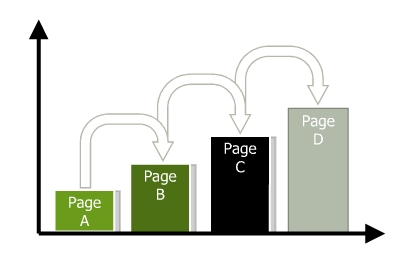
There’s no excuse for NOT testing. Testing is easy, fast and actually… fun! You get to test your gut feeling, learn new things all the time and exercise your creativity.
Testing should also never end. As soon as you have a winning page, try to build on that and test something else.
Incremental positive changes lead to substantial growth.
 

2. Create a compelling and clear value proposition

The potential of your conversion rate is determined by the value proposition, making it the most important conversion factor.
What exactly is a value proposition?
It’s the primary reason a prospect should buy from you. Customers not only want to know “What’s in it for me?” but “Why buy from you?”
If you had just 10 words to explain why people should buy from you instead of the competition, what would you say?
Many marketers try to improve results by changing page elements like font colors and sizes, button shapes, images, incentives, and so on, when the first step should really be focusing on strengthening their value propositions.
If your home page or the product page says “Welcome!” or lists just the name of your company or the product, you’re missing out. Note that there is a difference between the value proposition for your company and your product. You must address both.
What makes a good value proposition?
  • It must be differentiated from your competitors’ offers.
  • You may match a competitor on every dimension of value except one. You need to excel in at least one element of value (key important factor for the buyer).
Crafting a value proposition requires substantial reflection on what is unique about your company and your products and services. Having a powerful value proposition is not enough; it must be communicated effectively to achieve optimal results. You need to refine your value proposition until you can articulate it in a single, instantly credible sentence.
However hard you work on expressing your value proposition, to know its true effectiveness you must test to see how it resonates with your ideal prospect. Optimizing value propositions is a continual process that involves identifying, expressing, and testing/measuring. Use A/B testing to do it.

3. Set up a sales funnel

Sometimes what kills your conversions is that you’re asking for the sale (signup, whatever) too fast. People might be “just browsing”, not be psychologically ready or not in a hurry to buy right now.
The more expensive and/or complicated the product, the more time people need before they’re ready to commit. 
As I mentioned earlier, for software products sometimes offering a demo or a free trial instead of asking for a signup or purchase can bring significant improvement in conversions. But in many cases you need to just slow down and build a sales funnel to build trust, develop relationship and prove your expertise.
Let’s say your product is an online course on DIY home repair. Here’s how you should go about it.
What the visitor wants
  • To learn about DIY home repair
What you want
  • Get the visitor to buy your course
How to do it
  • Offer valuable free home repair advice via your blog, videos, free reports, whitepapers
  • Become their trusted advisor
  • Give them compelling reasons to sign up to your email list (in exchange for some good info)
  • Free drip content video course via email
  • Send them to your sales copy and ask for the sale
Some people say it takes at least 7 contacts with a prospective buyer before they’re ready to buy from you. I haven’t seen any recent research to back this up, but I know for a fact that the longer and deeper your relationship with the prospect, the more likely they are to buy from you.
So slow down. Offer value and results in advance, way before asking for the sale. Just capture their email address, so you could continue talking to them.

4. Cut the jargon

Clarity trumps persuasion, always.
Recently I came upon a site with the following value proposition:
“Revenue-focused marketing automation & sales effectiveness solutions unleash collaboration throughout the revenue cycle”
What does it mean? Can you now explain what they do and how is it useful to you? Not really, right?
Do not try to woo people with fancy, complicated business language – it just doesn’t work. 
You write for people, it’s people who read your site. A marketing director or a purchasing manager are people too. Don’t write for companies, write for people.
Clarity is something that I see marketers constantly struggling with. The best way to re-phrase all of the marketing speak on your site is to imagine you’re explaining your product to your close friend. If there’s a sentence worded in a way that you wouldn’t use in a conversation with a friend, re-word it.

5. Address objections

Whenever people read your offer, there will be friction. They’ll have some conscious and sub-conscious objections to what you’re saying and hesitations about taking the offer.
While during in-person sales we can uncover those hesitations with questions and address the concerns, online that’s kind of difficult. The solution is to prevent those objects by addressing all the possible issues in your sales copy right away.
Step one – create a list of all the possible hesitations and objections your potential customers might have. Step two, add info to your sales copy to eliminate or alleviate those concerns. The list can contains things like
  • You don’t understand my problem (explain the problems your product solves)
  • Why should I believe you? (show off your credentials, experience, awards etc)
  • What if it doesn’t work on me? (have testimonials of all kinds of users that have benefited from your product)
  • It’s not worth the money, there are cheaper alternatives out there (explain your price, compare with the competition, prove the value your product offers)
… and so on. It’s important to come up with as long list as you can. Seek external input, do user testing and ask your customers to figure out what all they might be concerned about.

6. Increase trust

Let’s say you walk down the street, and some random dude comes up to you. “Hey, wanna buy an iPad2? Just $50. It’s brand new.” Would you buy it?
You know the product is good. You know it’s a really good deal. But you probably wouldn’t still buy it. Why? Because you don’t trust him.
Sales guru Zig Ziglar once said that there are only 4 reasons why people won’t buy from you:
  • no need,
  • no money,
  • not in a hurry,
  • no trust.
We can’t do much about the first 3 reasons, but we can build trust. Add trust elements to your website and see your conversions increase.
So what makes people trust a website? The good thing is that Stanford Persuasive Technology Lab has studied this over the years and has the answer.
Here’s the list, make sure your website has all of the items present:
  • Make it easy to verify the accuracy of the information on your site. You can build web site credibility by providing third-party support (citations, testimonials, articles in well-known publications, source material) for information you present, especially if you link to this evidence. Even if people don’t follow these links, you’ve shown confidence in your material.
  • Show that there’s a real organization behind your site. The easiest way to do this is by listing a physical address. Other features can also help, such as posting a photo of your offices or listing a membership with the chamber of commerce.
  • Highlight the expertise in your organization and in the content and services you provide. Do you have experts on your team? Are your contributors or service providers authorities? Be sure to give their credentials. Are you affiliated with a respected organization? Make that clear. Conversely, don’t link to outside sites that are not credible. Your site becomes less credible by association.
  • Show that honest and trustworthy people stand behind your site. Find a way to convey their trustworthiness through images or text. Post employee photos and bios that tell about family or hobbies.
  • Make it easy to contact you. A simple way to boost your site’s credibility is by making your contact information clear: phone number, physical address, and email address.
  • Design your site so it looks professional (or is appropriate for your purpose). People quickly evaluate a site by visual design alone. When designing your site, pay attention to layout, typography, images, consistency issues, and more. Amateur-looking websites kill trust, invest in a quality designer.
  • Make your site easy to use — and useful.  Research shows that sites win credibility points by being both easy to use and useful. Some site operators forget about users when they cater to their own company’s ego or try to show the dazzling things they can do with web technology.
  • Update your site’s content often. People assign more credibility to sites that show they have been recently updated or reviewed. If you have a blog or a news section, make sure they’re updated regularly. Nothing says “out of business” like an abandoned blog.
  • Use restraint with any promotional content (e.g., ads, offers). Nobody likes hype, popups and blinking banners. People associate it with scam and spam. If possible, avoid having ads on your site. If you must have ads, clearly distinguish the sponsored content from your own. As for writing style, try to be clear, direct, and sincere.
  • Avoid errors of all types, no matter how small they seem. Spelling errors and broken links hurt a site’s credibility more than most people imagine. It’s also important to keep your site fast, up and running.

7. Make it easy to buy from you

Your goal has to be to make doing business with you as easy as possible. Your users should not try to figure out how to buy from you or where to click. It has to be intuitive and self-evident. As few clicks as possible.
Could your grandma be able to buy from your site within a minute or two?
  • Tell your users what they should do next. In every page, always guide the user towards the action you want them to take. Make the primary next step look more important than other links.
  • Do not give users too many options. The Paradox of Choice (a great book, btw) states that the more choice you will give your users, the easier it is to choose nothing. Choice paralyzes. If you have a lot of products, build better filters, so your prospects could identify the right one for them without spending too much time.
  • Ask to fill as few fields as possible. The more fields you have in your order or sign up form, the less people will fill it. Add the option to sign up via their Facebook or Google account. Don’t ask for anything that you don’t absolutely need to know in order to fulfill the order.
  • Do not force users to sign up in order to buy. Do you know the story of the 300 million dollar button? I suggest you read it. The main point: do NOT force people to sign up as a user in order to buy from you. Let them check out as a guest. It will make a world of difference.
  • Offer free shipping. Free shipping was the most popular motivation for 82% of UK and 80% of US consumers in a study conducted by eConsultancy, and gives etailers that offer this option a clear advantage over competitors.

8. Communicate value

A common mistake entrepreneurs make is that they do not provide enough information about the products and services they sell.
Let’s take that chair, for instance. If I’d describe it like this (all true facts):
  • Seat and back of breathable pellicle suspension material for long-term comfort.
  • Weight: 51 pounds
  • Color: Classic Carbon Pellicle
  • Full 12-Year Manufacturer’s Warranty
Price: $869.
Would you pay $869 based on what I just listed here?
No, that would be ridiculous. Yet so many sites do exactly that (luckily the maker of this chair provides more info than that).  They just list a bunch of bullet points with features along with the price.
The best way to sell products and services is to to add as much information about them as is possible. Pages and pages and pages, videos and images. It’s true that 79% of people won’t read it all, but 16% read everything! That 16% is your main target group.
If one reads all of the product info and is not convinced yet, you have a problem. But if one is convinced after reading just 1/4, they can skip the rest and just complete the purchase right away. Up to 50% of potential sales are lost due to inadequate information, says IDC, a global research company.
You need to provide enough information so that the prospect could convince themselves
Add pictures, videos, reviews to all of your products.  Intelligent, neutral and benefit-oriented sales copy works the best. Take a look at Amazon – they manage to create a lot of content for most products they sell, and they sell millions of products.
Aah, and list the price AFTER you communicate the value. Otherwise people might make a snap judgement based on the price without reading the value it offers.

9. Offer proof

Whatever you claim, you need to back it up with proof. People are skeptical and they want to see the evidence.
So what kind of proof can you provide?
  • Customer testimonials. People who used your products verify your claims. It’s a good idea to use testimonials from customers that were in a worse situation that the average customer. If even people in terrible circumstances could get the results, so can they!
  • Case studies. We’ve all seen before and after type of case studies. Very effective.
  • The results of scientific tests and studies. I know a log home manufacturing company that wrestled with the claims that log homes lose a lot of heat in the winter and they’re expensive to keep up. They commissioned an independent study from a well-known university. The study found that the log homes are as energy efficient as any other kind of buildings. Now the manufacturer can refer to this study to back up their claims.
  • Third-party reviews. Did a trade magazine or a blog write a glowing review? Show it off and link to it.
  • Social proof. If you have thousands of customers, make it a well-known fact. Nobody wants to be the only idiot using your service. If you have thousands of people / companies use your service, can’t be all that bad!
  • Show it! Nothing like a good demo to prove what your product does. Use videos that showcase your product in action.
Go over all the claims you make in your sales page and figure out how to add some proof.

10. Remove distraction

This is big. You want people to focus on a single action and not be distracted from it.
Are there items on the page that could divert the visitor away the from the goal?
The more visual inputs and action options your visitors has to process, the less likely they are to make a conversion decision. Minimizing distractions like unnecessary product options, links and extraneous information will increase the conversion rate.
On your landing pages and product pages, remove or minimize everything that is not relevant to users taking action.
  • Remove or shrink the menu.
  • Get rid of sidebars and big headers.
  • Take off irrelevant (stock) images.
Ask yourself is there anything else that you could take off page, something that is NOT contributing to the conversion?

11. Compare with the competition before they do

Every product and service has its competitors – direct and indirect. Research shows clearly that people do their homework before purchasing a product and compare among providers. It seldom happens that someone will buy your product without checking out your competition first.
Taking that into account, use it – compare your products to competing products before users do.
People are lazy. More often people compare things without giving it a lot of thought – they just look at the price and main features. For example when choosing a web host they look at the server space and monthly payment and that’s it. You, as an expert in your field, know that actually many other things should be considered.
When it’s you doing the comparison, you can point out the things you feel are your biggest advantages over the alternatives. If your product is more expensive than others, then this is your chance to explain why.
What if your competition is already doing it?
Imagine if your competitor is openly comparing your services and making it look like their offer is superior, and you don’t provide any information on why your product is better? A large number of people will take that competing offer.
Another benefit to adding product comparison pages to your website is that it can keep people from leaving your website. They can already do the comparison on your site, so why leave? It won’t keep all of them on your site, but you’ll definitely win over a good portion of visitors.
How to do the comparisons?
This depends on your product. If it’s a pure spec­-based product like say, a laptop, you can compare the specs (battery life, disk space, RAM etc) in a traditional table. If your product is more complex, use a more descriptive comparison.
If some of the specs are lower than the competition’s, point out that maybe your support is way better or you provide personal consulting or its more green or whatever. Also, admitting your shortcomings is a good thing – it makes the rest of your case more believable.
The traditional way is using tables like this, but probably you can come up with better, more creative ways.

12. Reduce or remove risk

Whenever there’s a transaction, there’s risk. Usually the vendor has the buyer carry most of the risk. If the risk seems to big, the purchase won’t take place.
Offer guarantees to eliminate or reduce the perceived risks your prospects might have. Here are some examples of great guarantees:
  • Hyundai and America’s Best Warranty. Hyundai struggled with years with a reputation that it makes crappy cars that break down fast. So they initiated a 10-year warranty – basically saying that ‘how can it be a bad car if we’re giving it such a long warranty?’ . Now Hyundai is considered the new Lexus.
  • The Punctual Plumber. Plumbers are renown for being late. To combat this prejudice, they branded themselves as ‘The Punctual Plumber’ and will pay you for every minute they’re late. If they’re willing to do it, they probably won’t be late, will they? Guarantee removes risk.
  • Pizza delivered in 30 minutes or it’s free. If you’re ordering pizza, the delivery time is a concern. With a guarantee like that, this fear is eliminated.
  • Not only will we give your money back, but also compensate your pain. This is the most powerful kind of guarantee – a pain compensation guarantee.
30-day money-back guarantee is like the industry standard and you should definitely not offer any less. Try to do better than that.
A/B test various guarantees to find out what works best.

13 Add incentives to take action right away

Is there an indication that the action needs to be taken now? The tone of the presentation, offers and deadlines can all influence urgency. I bet you have seen urgency notifications like this before:
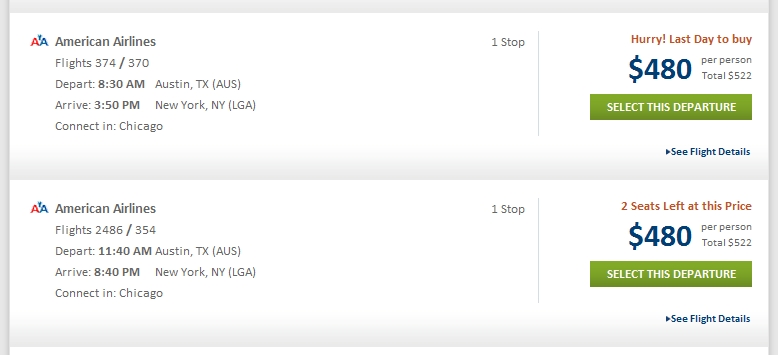
It might seem obvious to some and some might think it can’t possibly work, but it does and very, very well. Nothing creates urgency like scarcity.
There’s 2 kinds of of scarcity you can create:
  • quantity-related scarcity (2 seats left at this price)
  • time-related scarcity (last day to buy)
If the supply of your product is endless, you can give out time-sensitive bonuses, a free gift to first X amount of buyers or a discount if they complete the purchase within a certain time frame.
Word of advice: the reason for scarcity has to be authentic. Do not lie to your customers, ever. If it’s fake scarcity, people will know, and your trustworthiness plummets. It’s not worth it.
Thank you for reading. Until next time.
 

Friday, 27 November 2015

100 Awesome Marketing Tools You Should Know

As digital marketers, we all know that the right tools can make a big difference. They can increase our efficiency, help us collaborate, and organize everything that’s going on. With the help of these tools, we can do our jobs better.
That’s why we’ve curated 100 awesome marketing tools you should know. These tools can help you manage projects, collaborate with your team, amp up your content efforts, increase your social media savvy, and so much more.

Project management

These tools will help you organize and manage projects.
  1. Asana – Asana’s mission is to help teams to work together effortlessly, and they’ve created software that can bring your team together on countless projects.
  2. Trello – Trello is organized into boards and cards, and is an excellent tool for organizing projects with those in and outside of your organization.
  3. Basecamp – Often used by agencies to manage client work, Basecamp is a project management tool that’s simple and easy to use.
  4. Evernote – Need to keep track of a project? Use Evernote, an advanced note-taking app, to write everything down.
  5. Harvest – Harvest is a time tracking tool that allows you to spend less time managing your schedule, and more time doing.
  6. Todoist – To-do lists may seem old-school, but they work! Todoist is a task manager and to-do list app that can help you get everything done.

Team communication

These tools will help you communicate and collaborate with those in and outside of the office.
  1. Slack – Slack is a modern chat tool that brings all your team communication together. Send your coworkers GIFs and memes as you collaborate your way to success.
  2. HipChat – HipChat is a team chat tool that includes group and private chats, file sharing, and other integrations.
  3. Join.me – Need the perfect solution for virtual meetings? Join.me provides video, audio, and everything else you need to host successful virtual meetings.
  4. Google+ Hangouts – Because anyone with a Google account can use Google+ Hangouts for text, video, and audio chat, this is an easy tool to use to connect with those in and outside of your organization.

Calendars and appointments

These tools will help you seamlessly create calendars, appointments, and meetings.
  1. Calendly– Scheduling meetings over email can result in a lot of back and forth. Calendly, which syncs with your existing calendars, allows you to schedule meetings and phone calls with whoever makes a request.
  2. Doodle – Doodle makes scheduling simple and easy, especially when you’re trying to schedule a meeting with many people.
  3. CoSchedule – CoSchedule is an editorial calendar built for content marketers that can help you manage in-house writers as well as freelancers. You can also post your content to WordPress and social sites from CoSchedule.
  4. WordPress Editorial Calendar Plugin – This plugin syncs with your existing WordPress site to help you manage your calendar and schedule your content publishing.
  5. Gather Content – Gather Content provides seamless content planning, production, and workflow for agencies and in-house teams.

Search engine optimization (SEO)

These tools will help you with SEO audits, keyword research, and SEO-driven content marketing.
  1. Moz’s Open Site Explorer – Open Site Explorer allows you to identify link building opportunities through information on backlinks, top ranking pages, and social media activity.
  2. Screaming Frog – Screaming Frog is a web crawler, or spider, that crawls sites for helpful and relevant SEO information, allowing you to quickly audit and analyze a site’s SEO.
  3. SEMRush – SEMRush is a competitive analysis tool that allows you to see the highest volume keywords as well as how your site ranks compared to competitors.
  4. Yoast – When publishing on WordPress, you want to make sure your tags are taken care of, and Yoast can help any content creator do that.
  5. Google Keyword Planner – Google’s free keyword planner will help you determine search volume around keywords so you can determine your plan of attack.
  6. WordStream’s Keyword Tool – WordStream’s keyword tool is similar to Google’s in that it can help you assess which keywords are competitive and viable.
  7. UberSuggest – UberSuggest provides lists of relevant search terms, pulled straight from Google, to help you do effect keyword research and find new search opportunities.

Content marketing

These tools will help you with content ideation, content planning, and general content marketing efforts.
  1. BuzzSumo – BuzzSumo allows you to find the most shared content for certain topics, which can help you find out what types of content and from which sources have performed well in the past.
  2. Feedly – Feedly is a simple, intuitive, and well-organized RSS feed aggregator that allows you to read your favorite blogs in one place.
  3. Inbound.org – Inbound.org is a thriving community for inbound marketers for sharing relevant insights, articles, job postings, and more.
  4. Reddit – Reddit is an online forum that allows for upvoting and downvoting from members. It’s a great place to ask questions and find new ideas for content.
  5. UberFlip – UberFlip allows you to easily create a branded content resource center that brings together your videos, photos, social media channels, and eBooks.
  6. Quora – Quora is a question-asking platform that can help you research ideas for new posts, as well as get expert answers to your most pressing questions.
  7. Kapost – Kapost is a content marketing software solution that allows for easy scheduling, as well as team collaboration.

Writing & content creation

These tools will help you improve your writing and content creation abilities.
  1. Grammarly – Grammarly is an app that checks your grammar– in your browser or directly in Microsoft Office — for misconstrued sentences, punctuation mistakes, misspellings, and other grammatical woes.
  2. Hemingway App – In Hemingway App’s free web dashboard, you can copy and paste a piece of content, and the app will score it on readability.
  3. Google Docs – Google Docs is the perfect cloud-based word processor. Its advanced commenting and revision features make it perfect for content teams.
  4. WordPress – A favorite content management system and often considered an industry standard, WordPress allows you and your team to format and publish blog posts.
  5. Portent Idea Generator for Writer’s Block – This idea generator, created by Portent, is a fun content ideation tool for when you have writer’s block and are out of ideas.
  6. Emotional Marketing Value Headline Analyzer – This fun analyzer will show you which emotions are invoked when readers see your headlines.

Social media

These tools will help you share relevant content on social media sites.
  1. Buffer – Buffer is a social sharing and scheduling tool that syncs with all major social media sites. Buffer is perfect for individuals, social media teams, agencies, and others.
  2. Sprout Social – Sprout Social is a social media management tool that helps teams share content on social sites and analyze results.
  3. Discover.ly – Discover.ly is a browser extension for Chrome that allows you to see what’s being shared on social media sites as you browse the web.
  4. Nuzzel – Nuzzel collects the articles and links your Facebook and Twitter connects are sharing, then ranks them by the amount of shares they have.
  5. Studio for Instagram – Studio allows you to seamlessly edit Instagram posts before sharing with your network.
  6. IFTTT – IFTTT, which stands for “If this, then that,” lets you set up recipes to automate tasks. For example, you can set up a recipe that shares a blog post on Twitter each time a new one is published.
  7. Moz’s FollowerWonk – FollowerWonk helps you explore your social media presence by helping you dig deep into Twitter analytics to understand more about your followers.
  8. Topsy – Topsy provides advanced social media analytics to help you determine real-time sentiment around various topics.
  9. SocialBro – SocialBro gives you audience sentiment, analytics, and other tools to help you come up with a comprehensive and effective Twitter strategy.

Stock photos

These tools will help you find better than average stock photos to use for blog posts, social media, and other marketing assets.
  1. Death to Stock Photos – Sign up for Death to Stock Photos, and get free photos emailed to you each month. Go premium for full access to a library of great photos.
  2. MorgueFile – MorgueFile is a free photo archive that provides high-resolution stock photos for your illustration, design, or marketing needs. Simply search through the database for photos that work for you.
  3. Unsplash – Unsplash publishes a new, high-quality stock photo each day, and has a search field for finding past photos that fit your needs.
  4. Twenty20 – Twenty20 is a library of free stock photos taken by a community of photographers. The photos are of real life, not staged.
  5. Stocksy – Stocksy has a large selection of beautiful stock photos of real life moments at an inexpensive price.

Image creation

These tools will help you create compelling custom images and graphics for blog posts, social media sites, emails, and other online marketing efforts.
  1. Canva – Canva is an easy-to-use image creation tool that can help you quickly create fun and engaging images for various online marketing campaigns.
  2. PicMonkey – PicMonkey is a photo editing tool that allows you to edit, design, and touch up photos for use in your marketing.
  3. Meme Generator – Need to create a funny meme for a blog post or marketing campaign? You can easily create what you need using Meme Generator.
  4. Pablo by Buffer – Pablo allows you to create beautiful images for all social media sites in as little as 30 seconds.
  5. BeFunky – BeFunky is a photo editing and graphic design tool that’s easy to use for marketers, creatives, and non-designers.
  6. Tableau – Tableau can help you create data visualizations for your audience and clients, or for in-house presentations.

Email marketing & automation

These tools will help you send beautiful, helpful, and timely emails, as well as measure them for success.
  1. Campaign Monitor – Campaign Monitor provides elegantly simple email marketing software that makes it easy to create, send, and measure the impact of your email marketing campaigns.
  2. Email Monks – Email Monks provides email template design and newsletter and HTML coding services.
  3. Salesforce – Salesforce is a widely used, sales-oriented customer relationship management (CRM) solution that syncs with Campaign Monitor and other marketing tools.
  4. Litmus – Litmus syncs with Campaign Monitor and helps you test email marketing campaigns to find out what’s working, and what needs improvement.
  5. Campaign Monitor Dashboard for WordPress – Keep an eye on your subscriber list statistics within WordPress using this dedicated and well-documented dashboard widget.
  6. Boomerang for Gmail – Boomerang for Gmail lets you take control of when you send and receive email messages.

Web analytics

These tools will help you analyze your web visits– what visitors do when they come to your site, how long they stay, and where they come from.
  1. Google Analytics – Google Analytics gives you insight into how many viewers come to your site, how long they stay, what pages they visit, and where they come from.
  2. Dasheroo – Dasheroo is a free business dashboard solution that gives you and your team instant visibility into your KPIs.
  3. KISSmetrics – KISSmetrics is a person-based analytics solution that can help you better understand the exact makeup of your website visitors.
  4. Localytics – With Localytics, you can assess mobile engagement across a user’s lifecycle.
  5. Clicky – Clicky provides real-time web analytics to help you monitor, analyze, and react to web traffic in a timely manner.
  6. Raven – Raven, a particularly valuable option for agencies, helps you create engaging, thorough, and easy to understand marketing reports.

Customer engagement & success

These tools will help you communicate with your customers so that you can get feedback and improve the overall customer experience.
  1. Help Scout – Help Scout is a simple customer service software that syncs with email to make it easy to communicate with customers.
  2. Groove HQ – Groove HQ is a simple help desk software that helps you delight your online customers with awesome, personal support.
  3. Wootric – Wootric is a Net Promoter Score (NPS) tool that helps you analyze customer sentiment at important stages of the customer lifecycle.
  4. GetFeedback – GetFeedback provides easy-to-create, mobile-ready online surveys to help you learn what your customers are really thinking.
  5. Intercom – Intercom provides software that can help your team communicate with your customers wherever they are– whether that’s in a mobile app, on your website, or elsewhere.

Live chat

These tools will help you communicate with customers using live chat on your website.
  1. LiveChat – LiveChat is an easily installable and fully customizable live chat software that can help your customer support team.
  2. Userlike – Userlike provides intuitively designed live chat software for website support.
  3. Olark – Olark gives you insight into what your customers are doing on your site, such as what’s in their online shopping cart, and provides live chat capabilities as well.
  4. SnapEngage – SnapEngage provides fully customizable live chat software that integrates with Basecamp, Salesforce, SAP, and a host of other tools.

Conversion optimization

These tools will help you optimize your website for conversions.
  1. UserTesting – Wondering how people really use your website? UserTesting records a user going through your site to give you further insights on how your UX comes across.
  2. Unbounce – Unbounce allows you to build gorgeous SEO and PPC landing pages and easily A/B test them to see what works.
  3. LeadPages – LeadPages is an easy-to-use landing page generator with a variety of templates. The solution can help you create conversion-oriented pages.
  4. Optimizely – Optimizely is an A/B testing tool that allows you to test different iterations of pages on your site to see which is most successful.
  5. Crazy Egg – CrazyEgg is a heat map software that gives you insight into where users drop off on your site.

Webinars

These tools allow you to broadcast and share webinars and online fireside chats.
  1. GoToWebinar – GoToWebinar is a comprehensive webinar tool that includes registration, analytics, and survey tools.
  2. Blab – Blab allows you to broadcast live chats and conversations, making it easy to host an informal fireside chat or webinar.
  3. WebinarJam – WebinarJam is a powerful, inexpensive webinar software that uses Google+ Hangouts to record and share webinars.
  4. ReadyTalk – ReadyTalk offers audio conferencing, web conferencing and webinar technology to help you share insights with customers, clients, and colleagues.
  5. Google+ Hangouts – Google+ Hangouts live on air and recording features make it easy to use the platform to host a webinar or online chat.

Public relations and promotion

These tools will help you promote your business, marketing campaigns, and other initiatives.
  1. Help a Reporter Out (HARO) – HARO connects you with journalists who are writing about various topics and are looking for sources.
  2. LittleBird – Little Bird provides tools to help you discover influencers that can help promote your brand.
  3. Google Alerts – Google Alerts can send you an email or notification when your brand gets mentioned in newly published content around the web.
  4. Cision – Cision is a popular PR software solution that includes media list building, media monitoring, analyses, and more.
  5. BuzzStream – BuzzStream’s CRM-like software solution helps you organize your contacts and streamline media outreach.
  6. Rapportive – Rapportive is a Chrome extension that delivers comprehensive information about whoever sends you emails.

Advertising

  1. Twitter Ads – Twitter ads are a great way to get in front of a targeted audience on Twitter.
  2. Facebook Ads – Facebook Ads offer extremely impressive targeting capabilities that can help you get your brand– and your content– in front of a relevant audience.
  3. LinkedIn Ads – LinkedIn Ads are a great option for B2B companies looking to spread brand awareness, build name recognition, and generate new leads.
  4. Google AdWords – Google AdWords are a must for any marketer looking to attract those searching for answers on the web.
  5. Bing Ads – Though Bing is not as ubiquitous as Google, Bing Ads can provide a lot of value to your business for a lower price point.

Freelancers & consultants

  1. Clarity – Clarity connects you with industry experts, entrepreneurs, consultants, and freelancers who are available to chat via phone on a pay per minute basis.
  2. HourlyNerd – HourlyNerd connects small businesses and startups with seasoned MBAs who can offer advice and insights at an hourly rate.
  3. LinkedIn – LinkedIn is the ultimate destination for finding professionals across a wide array of industries that can help with your unique marketing needs.

Wrap up

It’s easy to be efficient and productive if you have the right tools to back you up. If you give them a try, these tools can help you take your marketing to the next level.
By checking out the 100 marketing tools in this post, you’ll be ready to take on new marketing projects today, tomorrow, and beyond.

Monday, 16 November 2015

25 Simple Ways to Grow Your Email List

grow-garden
 
I have some bad news: Your email marketing database degrades by about 22.5% every year. Your contacts' email addresses change as they move from one company to another, opt-out of your email communication, or abandon that old AOL address they only use to fill out forms on websites.
As a marketer, it's your job to make sure you're constantly adding fresh contacts to your email marketing campaigns so you can keep your numbers moving up and to the right.

Tuesday, 10 November 2015

How to Drive More Facebook Traffic to Your Website in 5 Easy Steps


Published February 4, 2014 


social media how to
Would you like to drive more Facebook traffic to your website?

Is quality Facebook traffic important to your business?
Getting Facebook fans to your website (and then hopefully onto your email list) is even more critical with Facebook’s recent announcement of decreased organic reach for pages.
Use these five steps to help you get more traffic Facebook to your website.

#1: Make Sure You Have a Steady Stream of Shareable Content on Your Website

If you have a website that never changes, you’re going to struggle to get much traffic to it. Posting links to the same page on your site over and over is as futile as Sisyphus rolling the boulder up the hill.
These days, the name of the game is content marketing and you had better figure out how your business can participate.
The fresh, new content you post on your site is important—not only for social media marketing, but also for search engine optimization. Google rewards sites featuring fresh content with higher ranking. But you don’t have to post epic blog articles three times a week to win at the content marketing game. Posting something new and helpful once a week or even once a month can benefit your website traffic.
Here are some ideas that can help you brainstorm how you can add new content to your website:
  • Post a weekly tip about your niche. It doesn’t have to be long; a paragraph or two with a nice photo will do just fine. Start with the frequently asked questions that come in from your customers.
  • Post a weekly news bite with a photo about what is happening in your business. This works well for businesses that have events.
  • Curate a list of top 10 helpful articles from around the web that you found that week. Add a short sentence about why you liked them.
  • Interview someone in your office or in your industry. The interview doesn’t have to be live or with video (but that makes it even better). You could send the interviewee a list of 5-10 questions beforehand.
roth heating & cooling website
Roth Heating & Cooling posts quick tips that benefit their audience.
Not only will you increase the keywords on your site (which benefits you on search engines), you can use this material for social media postings and in your email newsletter. A win-win-win!

#2: Make it Easy to Share Your Content to Facebook on Your Website

Once you have fresh content, you need to make it shareable. Your first step is to add a social share plugin and/or Facebook Share buttons.
I like using the Digg Digg plugin because it has all of the buttons I want to display and it floats along the side of the post as the reader scrolls through the article. But you may also want to consider adding static share buttons at the beginning and end of the post that are inline with the article. You can also do this with the Digg Digg plugin.
digg digg sharing plugin
The Digg Digg plugin has the floating sidebar and inline sharing buttons.
Don’t ignore share buttons on the individual pages of your websites. While people may not be sharing your “Contact me” page, you may have good content on a resource page of your website that you want to allow people to share easily.
Also consider asking for a Facebook share if you feel you have a particularly helpful blog post. Remind readers at the end of your article by saying something like, “Did you find this article helpful? Feel free to share it on Facebook by using the buttons below.” Remember that people are mostly going to share something that is useful to them. When you’re creating content, always keep your customer’s benefit in mind.

#3: Optimize Your Facebook Posts

The next thing you want to do is make sure to optimize the way you post. There are basically three different ways you can post a link to your website, and depending on your audience (and how Facebook’s algorithm happens to be working at the moment), you can get different results.
The traditional way to post a link is just to cut and paste the link into the status section and allow the link to pull in the photo and metadata. The issue with this method is the photo that is pulled in can show up smaller if it isn’t a 1.91:1 ratio, as mentioned in our recent Facebook Hacks article.
facebook update with small photo from website
If the photo on your website is not sized optimally, the link won’t pull in a large photo.
facebook update with large photo from website
When you have a photo that has the 1:91:1 ratio on your website, it appears larger in the news feed.
facebook update with no photo on website
And when you have no photo or description at all on your article, the fields are blank.
Another way to post a link is to post a photo and then add the link into the status update with a little blurb about the link. The nice thing about this is that the description travels with the photo when it’s shared so you’re then controlling the message a bit more. The other nice thing is that photos can show up larger in the news feed.
link posted with an image
Post an image with the link in a status update.
One technique that has been popular in the past to get greater reach is to post your link in the status section and then “X-out” the link data that is pulled in to change the post to “text only,” even though it has a link in it. The benefit of this in the past has been that text-only posts were getting more reach.
But Facebook recently announced that the new Facebook algorithm will show fewer text posts from pages. So we will have to watch how the effectiveness of this strategy changes.
link in an update with no image
Changing the post to a text-only post with a link may not work as well in the future.
With all of these approaches, you need to test which one gets the most engagement and drives the most traffic for you.
Once you post the content, you may want to consider boosting it with some advertising. See #5 for more information on advertising on Facebook.

#4: Optimize Other Places on Facebook to Add Links to Your Website

To drive more traffic to your website, make sure you have links in other parts of your Facebook page that people may be visiting.
Use your About page to direct people to different areas of your website.
website links on about page
Add links to your About page to direct people to different areas of your website.
Add links to your milestones.
website links on milestones
Milestones stay on your About page and can have links in them.
Add links in your photo descriptions.
When someone clicks on your photo, they will see the photo description.
website links in photo descriptions
Use links in your photo descriptions—especially your cover photo, which will be clicked on more often.
Use custom tabs with links to your website.
Consider using an application like NetworkedBlogs to bring in links to your blog posts into the tab automatically.
networked blogs
People can easily access your most recent blog posts.
Optimize your personal profile.
Don’t neglect your own personal profile when considering how you can drive more traffic to your website. Make sure you’re sharing your blog posts to your personal profile and optimize your own About section with links.
website link in facebook profile about section
Add links to your personal profile About section.
Editor’s Note: This section originally mentioned the Woobox redirect feature which is in violation of Facebook’s guidelines as listed in #11 here.

#5: Advertise

Advertising on Facebook can be a great option to get targeted traffic if you have a budget. And with Facebook’s recent announcements about decreased organic reach, advertising is going to be even more critical for marketers.
To drive traffic to your website, you can either create an ad from scratch with a link to your website, or boost content that you’ve already posted. When you boost content, remember to post something that doesn’t have a photo that has more than 20% text in it or it won’t get approved by Facebook. You can use Facebook’s text overlay tool to measure the amount of text.
boost your facebook post
Boosting a post with a link in it can be a good idea.
One issue that I’ve found with boosting a post is that it doesn’t usually result in a lot of link clicks. You typically get more likes and comments on the post, which boosts the engagement of the post itself. However, if you truly want clicks to your website, you’re better off using the Ads Manager and choosing that objective.
facebook ads manager
For a better click-through rate to your website, use the Ads Manager.
Remember to use the news feed ads to help you improve your click-through rate even more because the ads in the right column do not get clicked as much.
Guide your website traffic to achieve your goals.
Finally, make sure you know why you’re driving more traffic to your website. If your website isn’t giving a call to action once your visitors get there, you’re missing the point.
Each piece of content on your website should do something to escort your potential customer further along your sales funnel. You might ask for people to comment on your blog post to engage with them, or tell people to sign up for a freebie so you can get them on your email newsletter list or even pick up the phone to give you a call.
What do you think? Have you found a technique that works well for driving more traffic to your website? Please share your thoughts and comments below.